


Legzo Casino App: Download Guide for Android and iOS (Canada)
Legzo Casino offers a dedicated mobile app for Android devices and a full HTML5 browser platform that serves iPhone and iPad users without any installation. The review team tested both routes on an Android 14 handset and a current iPad: the complete catalogue of 5,600+ games, the cashier with Interac and crypto, bonuses and 24/7 support are all available on a phone. This guide covers installation step by step, explains why the app is absent from Google Play, and documents how the platform actually performs on mobile hardware. Verified: June 2026.
App or Mobile Browser: Choosing the Right Route

The most common misconception is that the browser version is a cut-down product. Testing showed near-total parity — the meaningful differences are convenience features, not content. Android users gain push notifications and one-tap access; iOS users lose nothing of substance by staying in Safari.
| Feature | Android app | Mobile browser |
| Full game catalogue (5,600+) | Yes | Yes |
| Live casino tables | Yes | Yes |
| Cashier: deposits and withdrawals | Yes | Yes |
| All bonuses and promo codes | Yes | Yes |
| Push notifications | Yes | No |
| Installation required | Yes (~APK download) | No |
| Storage footprint | Modest, plus updates | None |
| Updates | Manual / in-app prompts | Automatic |
Two practical scenarios illustrate the choice. A commuter who plays short Aviator or slot sessions daily gains real value from the app: the icon is one tap away, push alerts flag the Wednesday cashback window, and login persists between sessions. A weekend player who joins a couple of live blackjack tables a month loses nothing in the browser and avoids the APK ritual entirely. Households sharing an iPad have a third reason to prefer the browser: no installed gambling app sits on a shared device, and the session ends cleanly when the tab closes — a small responsible-gambling advantage worth noting for families.
The practical recommendation: frequent players on Android benefit from the app; occasional players and all iOS users are perfectly served by the browser.
Installing the Android App: The APK Walkthrough
Like virtually every offshore casino, Legzo distributes its Android software as a direct APK file rather than through Google Play. The process takes about two minutes.
Before starting, two prerequisites save time: free up a small amount of storage for the package, and have the account credentials ready — the app signs in with the same email and password as the website, so there is no separate mobile registration. Players who have not yet opened an account can do so inside the app after installation or follow the dedicated walkthrough (/legzo-casino/login/) beforehand; either order works.
Six Steps From Download to First Spin
- Open the official Legzo Casino site in the phone's browser and locate the mobile app section in the menu or footer.
- Tap the Android download button to fetch the APK file.
- When the system warns about unknown sources, open settings and allow installations from the browser — this is standard for any APK.
- Open the downloaded file and confirm the installation.
- Launch the app, then log in or register; existing credentials work without changes.
- Optionally re-disable unknown-source installs in settings once finished.
Why There Is No Google Play Listing
Google Play prohibits real-money gambling apps from operators without local licensing in the user's country. Since Legzo runs on a Curaçao licence rather than a provincial Canadian one, direct APK distribution is the only compliant channel for Android. This is normal for the offshore segment and not, in itself, a red flag.
Security Rule: Official Domain Only
The one genuine risk in APK distribution is fake files. Modified casino APKs circulating on third-party download portals are a known fraud vector for credential theft. Analysts advise downloading exclusively from the official legzo.casino domain, checking the address bar certificate before tapping the button, and never sideloading the app from forums or mirror archives.
Legzo on iPhone and iPad: The Current Picture
As of June 2026, the practical route on iOS is the browser platform, with an "Add to Home Screen" web-app providing app-like access. Published reviews disagree on whether a native App Store build exists for all regions, so this guide states only what was verified on test hardware: Safari on iPad delivered the full lobby, the cashier and live tables with no functional gaps, and performance matched the desktop session.
Creating a Home-Screen Shortcut in Three Taps
- Open the casino site in Safari and tap the share icon.
- Choose "Add to Home Screen" and confirm the name.
- Launch Legzo from the new icon — it opens full-screen, without browser chrome, behaving like an installed app.
How 5,600+ Games Run on a Phone

The mobile lobby keeps the desktop filters — by provider, theme, feature and popularity — plus a search bar for direct title lookup. In testing on an LTE connection, slots such as Book of Kemet and Gates of Olympus 1000 loaded in roughly three seconds, and switching between titles produced no crashes across a half-hour session. Live tables from Pragmatic Play and Evolution, including Crazy Time, are formatted for portrait orientation with readable bet grids. Crash games — Aviator, JetX, SpaceXY — are particularly well suited to short mobile sessions. One honest caveat echoed by other testers: the lobby's category navigation takes a few minutes to learn, and a volatility filter is still missing from the search tools.
Data, Battery and Session Stability
Measured consumption is moderate: standard video slots used a few megabytes per ten-minute session, while live dealer streams are the heaviest component and are best played on Wi-Fi. Battery drain over a 30-minute mixed session was comparable to video streaming apps, and the platform restored the session correctly after an incoming call interrupted a live blackjack hand — the bet state synced back without loss. Demo mode is available on mobile as well, which lets newcomers learn a slot's mechanics on the bus without touching their balance.
Banking From a Mobile Device

The mobile cashier is identical to desktop: Interac, cards, e-wallets and crypto, all from C$20 with no fees. An Interac deposit from the phone takes three steps — open the cashier, choose Interac and the amount, confirm in the banking app — and funds arrive instantly. Document upload for verification works directly from the phone camera, which speeds up KYC considerably. The structural limits still apply on mobile: a C$400 daily withdrawal cap at Bronze status and the additional review rule for cash-outs above C$1,875. The complete method-by-method table lives on the main review (/legzo-casino/#payments).
| Method | Withdrawal time | Mobile notes |
| Interac | 0–24 hours | Confirms via banking app |
| E-wallets | 0–24 hours | Full support in app and browser |
| Crypto | 0–24 hours | QR-code addresses on screen |
| Cards | 0–5 business days | Slowest settlement route |
Bonuses and Push Offers on Mobile

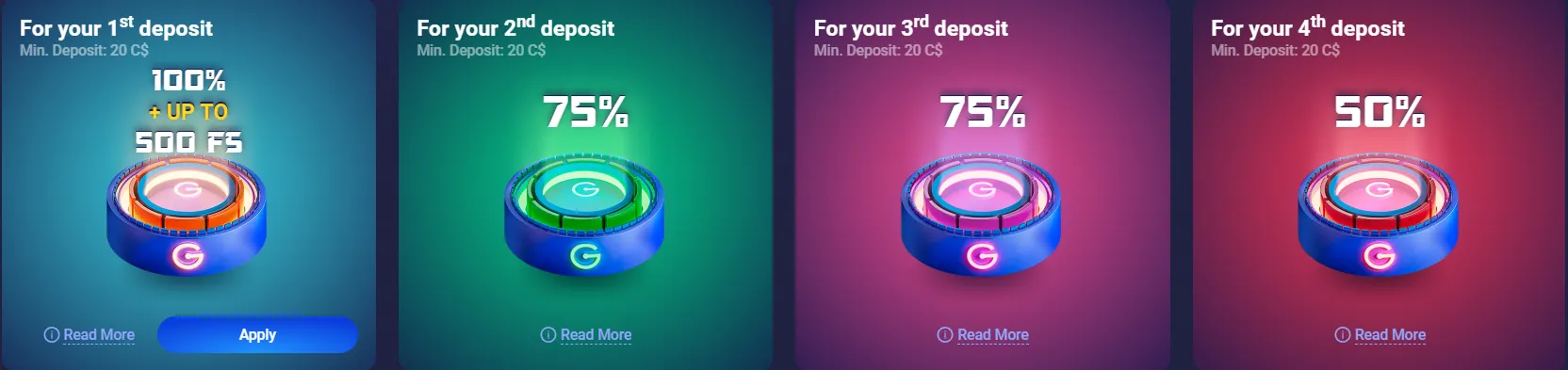
There is no separate "app-only" bonus — the welcome package, reloads and cashback are identical across platforms, and promo codes entered on mobile work exactly as on desktop. What the app adds is push notifications for weekly reload and cashback windows. Players who find promotional nudges unhelpful can switch them off in the device's notification settings — a small but worthwhile responsible-play habit. Current codes and the wagering calculator are maintained on the bonus page (/legzo-casino/bonus/).
First Hour on Mobile: A Tested Routine
The smoothest verified path for a new mobile player runs as follows: install the app or bookmark the site, register in roughly three minutes, set deposit limits in the profile before the first payment, deposit C$20–C$100 via Interac, enter any promo code on the bonuses page before confirming the qualifying deposit, and try the demo version of an unfamiliar slot before committing real funds. Players following that order avoid the two most common mobile support tickets — bonuses lost to a deposit made before the code was entered, and verification delays at the first withdrawal.
System Requirements and Common Fixes
The platform is undemanding: any reasonably current Android or iOS version with a stable connection handles it. The issues below cover nearly every support ticket category observed.
- APK won't install: unknown-source permission was not granted for the browser — enable it in security settings and reopen the file.
- App opens to a blank screen: clear the app cache or download the latest APK; outdated builds are the usual cause of login errors.
- Geo-restriction notice: availability depends on the player's jurisdiction. Note that masking location with a VPN may breach the operator's terms and put winnings at risk, so it is not a recommended workaround.
- Games stutter on cellular data: live tables stream video — switch to Wi-Fi or lower the table video quality.
- Login fails on mobile: reset the password via email or follow the dedicated troubleshooting guide (/legzo-casino/login/#troubleshooting).
Notifications, Limits and Self-Control on a Phone
Because a phone keeps the casino permanently within reach, mobile players benefit most from the platform's responsible-play controls. Deposit limits and session timers set in the account profile apply across app and browser alike, and self-exclusion activated through support closes every route simultaneously. Pairing those tools with disabled promotional push notifications produces a deliberately quieter mobile experience — a configuration the review team recommends to anyone who notices session lengths creeping upward. Confidential support for Canadian players is available through ConnexOntario (1-866-531-2600) and CAMH.
Mobile Test Summary
Across the test window the platform scored 4.5/5 for mobile: Android app and iPad browser both delivered the full catalogue, instant Interac deposits, sub-24-hour withdrawal access and stable live streams, with measured slot load times around three seconds on LTE. The deductions are the missing volatility filter and a lobby layout that rewards patience. New players can create an account in about three minutes (/legzo-casino/login/) and claim the welcome package immediately after the first deposit.
What the Mobile Product Still Lacks
Three improvements would lift the score to full marks. First, a search filter by volatility or bonus-buy availability — with 5,600+ titles, theme filters alone are no longer enough. Second, a richer in-app FAQ: simple bonus questions currently push players into live chat, which works but takes longer than self-service would. Third, a documented App Store position for Canadian iOS users, since the current ambiguity forces guides like this one to hedge. None of these gaps affects money handling or game fairness; they are usability debts, and the operator's update cadence suggests they are fixable.
Mobile FAQ
Does Legzo Casino have a real app?
Yes — a downloadable Android app distributed as an APK from the official site, plus a full-featured HTML5 browser version for all devices.
How is the Android APK installed?
Download the file from the official site, allow installations from the browser when prompted, open the APK and confirm. The process takes about two minutes.
Is there a Legzo app for iPhone?
iOS users play through Safari or an "Add to Home Screen" web-app; the browser version carries the complete catalogue and cashier with no functional loss.
Can deposits be made with Interac from the app?
Yes — the mobile cashier supports Interac from C$20 with instant crediting, confirmed through the user's banking app.
Are mobile bonuses different from desktop?
No. All offers, codes and wagering terms are platform-independent; the app only adds push notifications about active promotions.
Why is the Legzo app not working?
The usual causes are an outdated APK build, a blocked unknown-sources permission, or a geo-restriction. Updating the app and checking regional availability resolves most cases; support is available 24/7 via live chat.
Play 5,600+ games on the go — download the app or play in the browser. 19+ (18+ in AB, QC, MB). Play responsibly — ConnexOntario 1-866-531-2600.